n8n Workflow Manager
架構解析
一開始只是想解決「做了一堆工作流,要怎麼查找?」、「改了工作流,文件卻沒人跟著更新」這些老問題,最後才慢慢長成一個本地管理工具。
接下來會拆開說明幾個關鍵決策,像是 Process 隔離、vis.js 拓樸還原,還有 Mermaid v10 語法修補器是怎麼做的。
先把痛點解決,
再把流程接起來。
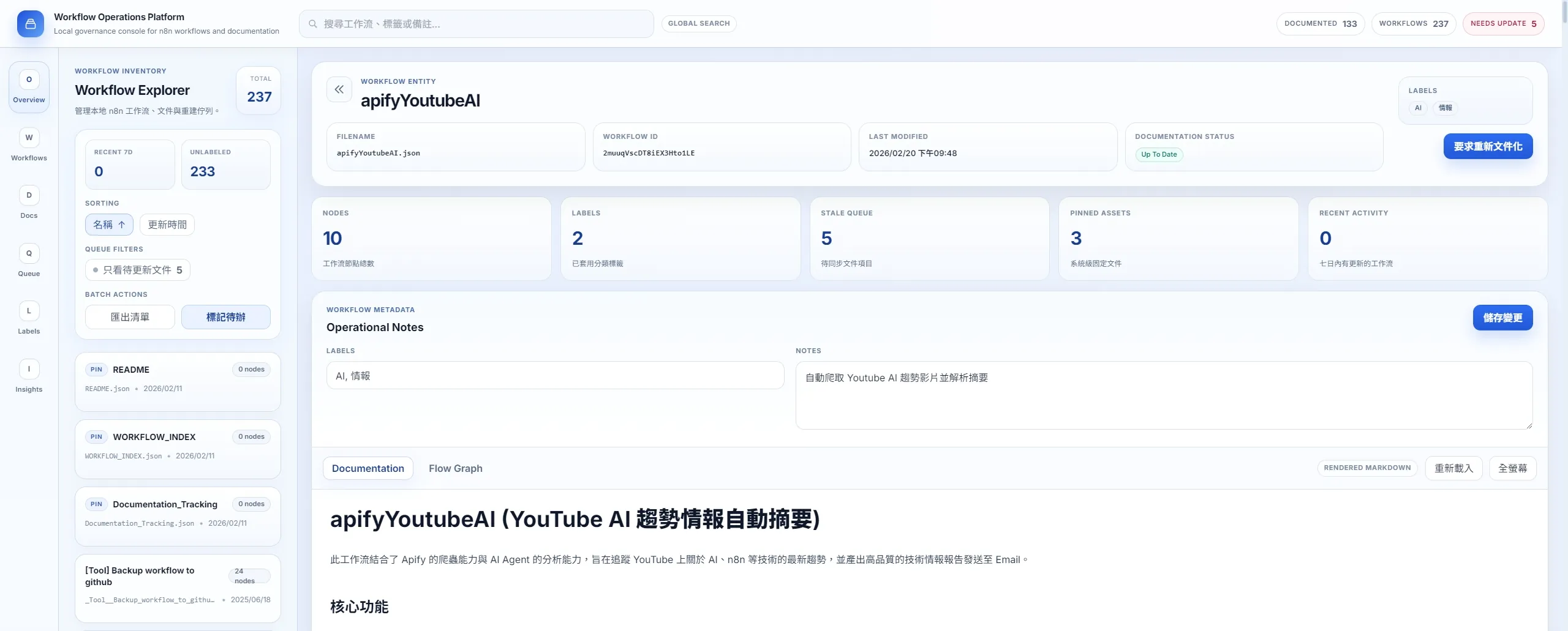
使用 AI Coding 做了一個本地桌面工具,把工作流查找、檔案異動紀錄、文件狀態檢核放在同一個介面裡,一目了然。
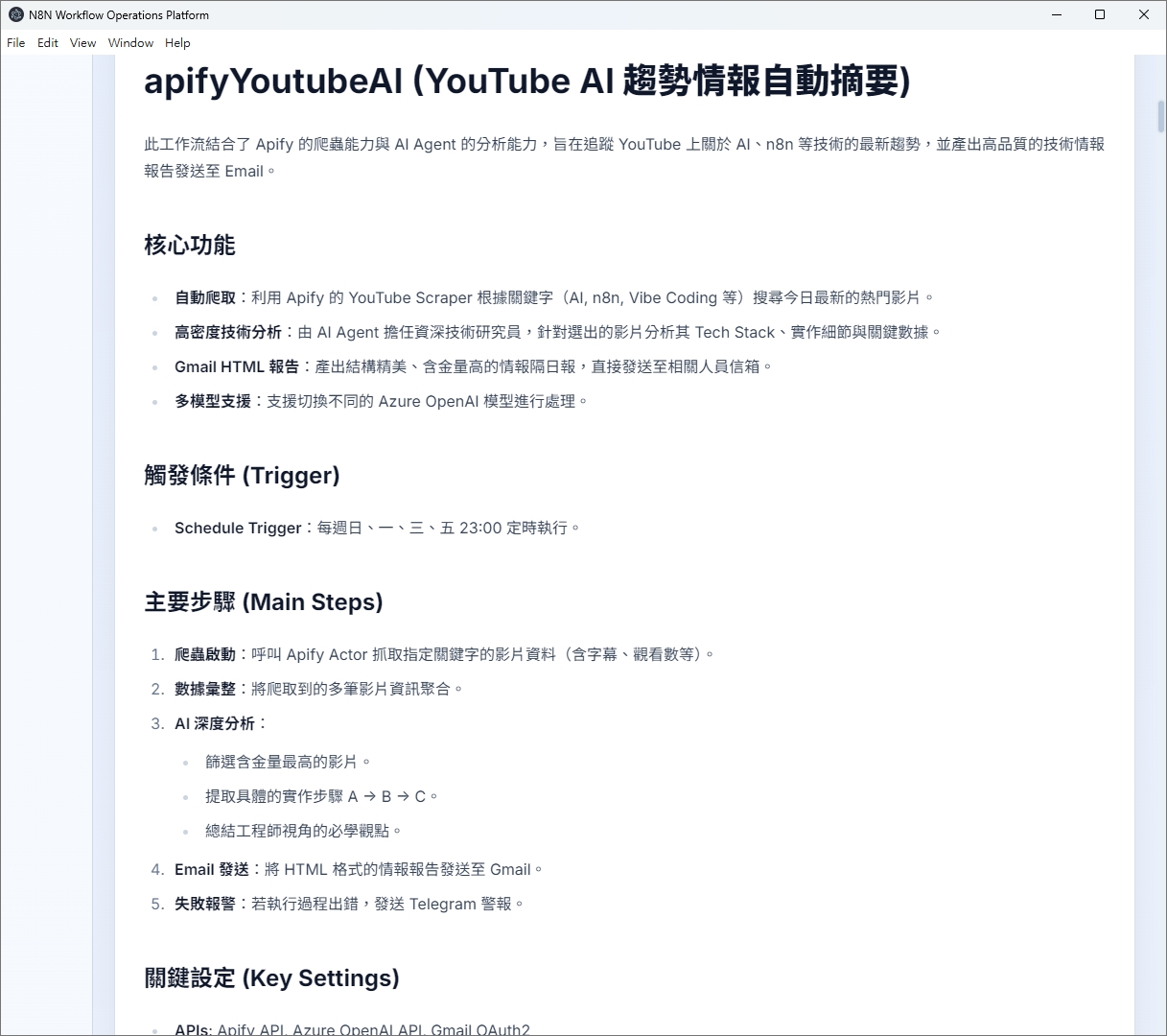
30 秒看懂這個技術頁
- Role: Internal Tool Builder / Workflow Platform Designer
- Problem: 單靠 README 或人工整理,無法跟上 workflow 持續演化造成的文件漂移。
- Built: Electron 桌面工具,結合 Alpine.js 介面、Mermaid 修正器、vis.js 拓樸還原與文件狀態檢核。
- Stack: Electron, Alpine.js, Mermaid, vis.js, IPC, n8n_documenter agent workflow。
- Result: 把 workflow 管理、文件補齊與可視化重建整合成同一套維運工具鏈。
可信度與取捨
- What this demonstrates: 我能從桌面應用、資料結構到 AI 補文件流程,完整設計一套 internal tool architecture。
- Project Status: Personal PoC / production-like prototype。
- Metrics Methodology: 指標來自個人 PoC、流程實測或專案觀測,用於說明改善幅度與評估方法;實際導入效益會依團隊規模、流程成熟度與系統限制而異。
- Evidence: 架構解析、UI 截圖、Mermaid 修復邏輯、文件狀態面板與技術拆解。
- Source Access: 本頁提供架構與去識別化流程說明;未公開細節以畫面與設計決策替代。
- Trade-offs: 桌面架構較利於地端控制,但安裝與跨機部署成本較高,且圖形修復邏輯需要持續跟著 workflow 型態演進。
30 秒摘要
- 這是一個 n8n 在地工作流管理工具,解決的核心問題是「難以查找、迭代了工作流,文件跟不上」。
- 核心亮點之一:自製 Mermaid v10 語法自動修復腳本(fix-mermaid.js),批次掃描並修正 AI 生成的 Markdown 裡的語法地雷。
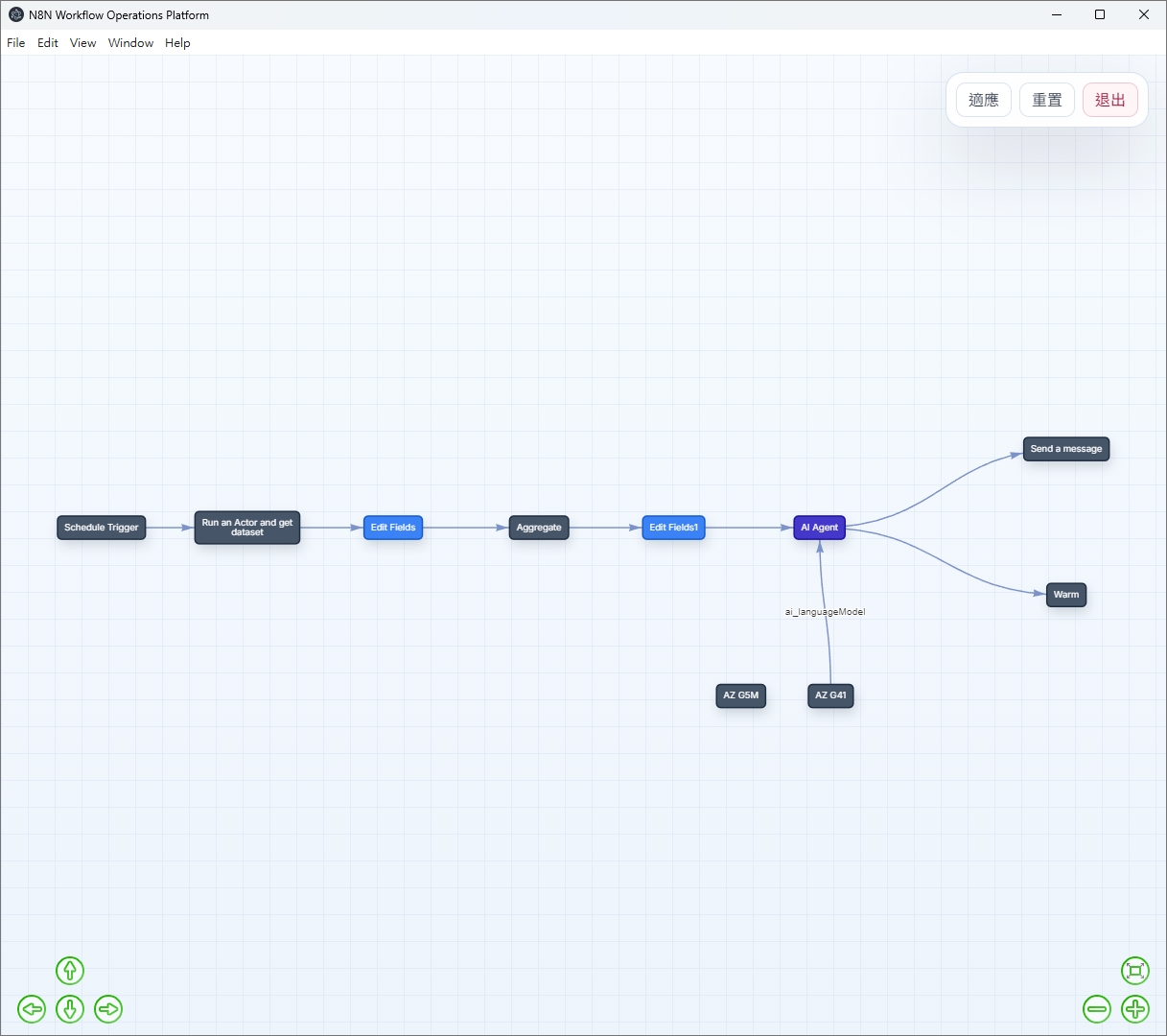
- 另一個關鍵點:把 n8n JSON 拓樸轉成 vis.js 互動圖,不用開 n8n 官方 UI,也能在本地快速看懂流程結構。
- 整個工具「值不值得做」的判斷點,在於工作流數量和交接頻率。當流程大約超過 15 到 20 個、而且有人會接手或回頭維護時,文件搜尋、比對和補齊才會開始吃掉明顯成本。
章節目錄
01 // 導入邊界:什麼時候值得做這套工具?
任何工具都有它發揮效益的最低規模門檻。這個 Manager 也不例外。
- n8n 工作流數量 < 15 個:用資料夾 + README 就夠了。
- 文件需求為零:部分個人或 PoC 專案根本不需要文件,生命週期太短。
- 團隊精通 n8n,沒有新人接手風險:文件帶來的 ROI 遠低於維護成本。
- 工作流 > 20 個且持續成長:搜尋與狀態追蹤的價值開始顯現。
- 有新成員加入:文件是最有效的 Onboarding 工具,降低口耳相傳成本。
- 已搭配 n8n_documenter Agent Skill:Manager 負責找出哪些文件落後,documenter 負責補內容;若少了前者,Agent 不知道先處理哪一份,若少了後者,待辦清單還是得靠人逐筆收尾。
02 // Tech Stack at a Glance
| 元件 | 語言 / Runtime | 核心依賴 | 職責 | 狀態儲存 |
|---|---|---|---|---|
| main.js | Node.js (Electron Main) | fs.promises, glob |
IPC 處理 · 所有檔案 I/O | JSON / TXT / MD 純文字 |
| preload.js | Node.js (Context Bridge) | contextBridge, ipcRenderer |
安全橋接 · 白名單 API 曝露 | 無(純橋接層) |
| renderer.js | JavaScript (Alpine.js v3) | Alpine.js, vis.js, Mermaid |
UI 狀態 · 搜尋排序 · 圖表渲染 | Alpine.js 響應式狀態 |
| fix-mermaid.js | Node.js (standalone) | glob, fs, RegEx |
批次修復 AI 生成的 Mermaid 語法 | mermaid-fix-report.json |
把檔案權限收回 Main Process,
不要讓 UI 直接碰。
我沒有讓 Renderer 直接讀寫檔案,而是把權限集中在 Main Process。這樣做比較麻煩,但邊界比較清楚,之後要查問題也比較集中。
03 // 設計哲學:為什麼要嚴格做 IPC 隔離?
Electron 最省事的寫法,通常是直接在 Renderer 引 Node.js 模組把事情做完。但這樣一來,UI、檔案 I/O 和錯誤處理會黏在一起,後面要補安全邊界、除錯和擴功能都會變得很痛苦。
反模式:Renderer 直接操作檔案系統
如果 Renderer 可以直接 require Node.js 原生模組,代表畫面層同時也拿到了系統層級的檔案讀寫權限。
- 風險邊界太寬:一旦 Renderer 吃到 XSS 或第三方套件出問題,就可能直接碰到底層檔案。
- 耦合過高:檔案 I/O 和 UI 渲染綁在一起,測試時很難只替換其中一層。
- 失敗點分散:畫面錯誤和寫檔錯誤混在同一層,出事時不容易定位。
本系統:嚴格 IPC 隔離設計
我把所有 fs 操作集中在 Main Process,Renderer 只能透過 contextBridge 暴露的白名單 API 做非同步呼叫。
- 風險比較容易收斂:開了
contextIsolation與sandbox之後,Renderer 不能直接碰 Node.js。真的發生 XSS,也比較不容易一路打到底層檔案。 - 資料契約比較清楚:preload.js 只暴露必要 API。這樣每次加功能都要多補一層橋接,開發會慢一點,但誰能做什麼會比較清楚。
- 失敗點集中:I/O 錯誤留在 Main Process,Renderer 只接結果和狀態。這不代表 UI 一定更快,但至少問題比較容易分層定位。
IPC 資料契約:每個 Workflow 物件的型別定義
Main Process 和 Renderer 之間只傳遞一個乾淨的 JS 物件,不暴露任何 fs handle 或路徑引用:
// Data contract: what the Renderer receives via IPC
{
  filename: string,         // e.g. "MyFlow.json"
  name: string,             // from JSON .name field
  workflowId: string,       // from JSON .id field
  mdContent: string,        // full markdown content (empty if no MD file)
  txtContent: string,       // memo text from corresponding .txt
  labels: string[],         // tags parsed from .txt line 2
  stats: {
    nodes: number,          // node count from JSON
    mtime: Date,            // JSON last modified time
    mdMtime: Date | null    // MD last modified time (null if no MD)
  },
  needsDocUpdate: boolean   // true if JSON is >60s newer than MD
}04 // 核心元件解析
[COMPONENT-01] fix-mermaid.js — Mermaid v10 語法自動修復器
Batch Fix · RegEx · n8n DocsAI Agent 生成的 n8n 流程說明文件常會帶 Mermaid 流程圖,但 Mermaid v10 的語法容錯比舊版低很多。結果不是「圖不好看」而已,而是整段文件在本地根本打不開,這就變成真正的 failure mode。
- Subgraph 含空白直接作為連接點:
A --> RAG Tools(非法) <br>未自閉合:v10 要求<br/>- 節點標籤含括號未加引號:
A[Deploy (v2)](非法) - 雙向箭頭連接到 subgraph 名稱:
<--> RAG Tools
- 提取所有
subgraph定義,自動補上 ID(RAG Tools → RAG_Tools["RAG Tools"]) - 批次將
<br>置換為<br/> - 比對含括號的節點標籤,自動在標籤外加引號
- 輸出 JSON 修復報告,無法自動修復的發出 ⚠ 警告供人工處理
// Extract all subgraph definitions to find labels with spaces
const subgraphRegex = /subgraph\s+(?:"([^"]+)"|(\S+))/g;
let sgMatch;
while ((sgMatch = subgraphRegex.exec(fixedBlock)) !== null) {
    const label = sgMatch[1] || sgMatch[2]; // quoted or unquoted label
    subgraphs.push(label);
}

// For subgraphs with spaces in their name,
// add an ID so arrows can reference them safely
const sgId = sgLabel.replace(/\s+/g, '_');   // "RAG Tools" → "RAG_Tools"
const oldDef = new RegExp(`subgraph\\s+"${escapedLabel}"`);
const newDef = `subgraph ${sgId}["${sgLabel}"]`; // add explicit ID

if (oldDef.test(fixedBlock)) {
    fixedBlock = fixedBlock.replace(oldDef, newDef);
    // Also update all arrow references to use the new ID
    fixedBlock = fixedBlock.replace(
        new RegExp(escapedLabel, 'g'), sgId
    );
}[COMPONENT-02] n8n JSON → vis.js 拓樸還原
vis.js · JSON Parser · Custom Color Map我希望離開 n8n 官方 UI 之後,還是能在本地工具裡看懂流程拓樸。真正的麻煩不在畫圖,而在怎麼把 n8n JSON 轉成 vis.js 能吃的 Edge/Node 結構。
n8n 的 connections 以「來源節點名稱」作為 key,而不是節點 ID:
"connections": {
  "HTTP Request": {    // source node NAME, not ID
    "main": [[
      { "node": "Set Data", "type": "main", "index": 0 }
    ]]
  }
}
這需要先建立 name → id 的 lookup map,才能輸出 vis.js 需要的 from/to ID 格式。
// Color mapping: n8n node type → hex color
const typeColors = {
    'n8n-nodes-base.webhook':        '#10B981', // green
    'n8n-nodes-base.httpRequest':    '#3B82F6', // blue
    'n8n-nodes-base.if':             '#EF4444', // red
    'n8n-nodes-base.switch':         '#F59E0B', // amber
    '@n8n/n8n-nodes-langchain.agent':'#8B949E', // gray
    'default':                       '#6B7280'  // gray fallback
};physics: false 直接使用 n8n JSON 的 position 欄位還原節點座標,不需要重新 layout。對「偶爾看一眼流程結構」的需求來說已完全足夠,遠超過維護整個 Vue 生態系的成本。[COMPONENT-03] Alpine.js 響應式狀態設計
Alpine.js · Getter · Match PriorityRenderer 選擇 Alpine.js 而非 Vue/React,是因為這個工具的 UI 複雜度不需要完整的元件系統,但確實需要響應式狀態管理。
搜尋結果依匹配類型加權排序,兼顧置頂項目:
// Match priority: filename > label > memo
const matchPriority = {
    'filename': 1,
    'label':    2,
    'memo':     3
};

// Pinned files always stay on top (regardless of search)
if (aIsPinned && !bIsPinned) return -1;
if (!aIsPinned && bIsPinned) return 1;
// Then sort by match relevance
return matchPriority[a.matchType] - matchPriority[b.matchType];Alpine.js 的 DOM 更新是非同步的,切換工作流後 $refs.docsPreview 不一定立即存在:
// Poll until docsPreview ref is available
const waitAndRender = (retries = 20) => {
    if (this.$refs.docsPreview) {
        this.renderMarkdown(); // ref ready → render
    } else if (retries > 0) {
        // Keep polling every 25ms (max 500ms wait)
        setTimeout(() => waitAndRender(retries - 1), 25);
    }
    // Silent fail after 20 retries (graceful degradation)
};先把語法錯誤收斂,
再把拓樸還原出來。
我先把 Mermaid 常見語法問題批次修掉,再交給 vis.js 做圖。這樣做的目的不是追求畫面炫,而是把失敗點集中起來,讓文件至少能穩定打開、流程也能看得懂。
05 // Lessons Learned 踩坑筆記
Mermaid v10 升級後所有圖表全數崩潰
原本的做法:Mermaid 版本從 v9 升級到 v10,因為 v10 有更好的主題支援。
出現的問題:升級後,所有包含 subgraph 或 <br> 的圖表全部報 Error: Parse error,控制台一片紅,圖表一張都顯示不了。
修正方式:逆著版本 changelog 逐一找出 v10 的 breaking changes,再針對 AI Agent 生成 MD 的常見模式,開發 fix-mermaid.js 批次修復腳本,做到「改一次,未來的 MD 也自動處理」。
Alpine.js $refs 在 Markdown 渲染時偶發為 null
原本的做法:切換工作流後直接呼叫 this.renderMarkdown(),在函式裡拿 this.$refs.docsPreview 當渲染容器。
出現的問題:快速切換工作流時,偶發性出現「無法將 innerHTML 設定到 null」的錯誤,因為 Alpine.js 的 DOM 更新是 microtask queue 非同步的,ref 偶爾還沒掛上就去拿。
修正方式:改成 polling 策略(每 25ms 最多 retry 20 次),同時在 selectWorkflow 開頭先主動清空舊容器,避免切換時有殘留內容的視覺錯位問題。
n8n 連線結構以「名稱」而非 ID 作為 key
原本的做法:以為 n8n connections 物件的 key 就是節點 ID,直接把它當作 vis.js 的 from/to 來用。
出現的問題:所有連線在 vis.js 渲染時都找不到對應的節點,圖表只有節點沒有邊,所有流程看起來都是孤島。
修正方式:閱讀 n8n JSON schema 才發現 connections key 是節點的 name 而不是 id(兩者都有,但格式完全不同)。解決方案是先建立 name → node Object 的 lookup map,再從 targetNode.id 取得 vis.js 需要的 UUID。
同頁面多次呼叫 mermaid.run() 導致圖表重疊
原本的做法:切換工作流後重新渲染 Markdown,直接再次呼叫 mermaid.run() 套用到整個 document body。
出現的問題:Mermaid 在同一個 DOM 環境多次 run 時,會把已渲染過的 SVG 元素再包一層,導致圖表出現重複渲染的殘影,版面崩潰。
修正方式:改為 mermaid.run({ nodes: container.querySelectorAll('.mermaid') }),只針對當前容器內的節點執行,而不是全域掃描,同時在切換前先清空容器 innerHTML 確保乾淨狀態。